

Your grants deserve better than a rented filing cabinet.
DWR Grant Writer Pro is a grant workbench for grant writers and small organizations. Use our platform, or put your own brand on it. 27 modules cover everything from finding funding to closeout, with an AI assistant that helps you research funders and draft proposals.

- Starter Funders
- Foundations
- RFP Checklist
- Federal Grant Data
- Client Data Ownership
The problem
Sound familiar?
Most grant teams we work with started exactly here.

Spreadsheets everywhere
Grant deadlines live in one sheet, funders in another, and reporting in a third. Nothing talks to each other.
Reinventing every proposal
Each new application starts from a blank page, even though you have years of funded proposals sitting in a folder.
Lost institutional knowledge
When a team member leaves, their grant history, relationships, and insights leave with them.
Compliance is reactive
You find out about reporting deadlines when the funder sends a reminder, usually with days to spare.
No single source of truth
The ED, the grant writer, and the finance director each have their own version of the same grant.
Siloed research
Hours spent searching for funders, only to discover a colleague already had a relationship with them.
There is a better way.
How success happens
The right process
Eight steps take you from an idea to an application in the mail. Every step has a place in the platform, and each step hands its work to the next one.
- 1ResearchFind open grants and see who gets funded.
- 2Match and Save FundersRate funders, then keep their details and contacts.
- 3Read the RFPTurn the announcement into a checklist.
- 4WriteDraft from templates and build the budget.
- 5OrganizeFile everything under the funder and grant.
- 6Build the ApplicationStart new or finish a pending draft.
- 7CheckCompliance score, then the Application Audit. Gaps found? Go back, edit, check again.
- 8SubmitPrint, mail or upload, then record it.
Want to see the screens behind each step? See How It Works or browse all 27 modules.
The platform
27 modules. One workspace.
From funder discovery to grant closeout, DWR Grant Writer Pro covers every stage of the lifecycle. Here are the six core areas that tie it all together.
Live Grant Discovery
Real-time Grants.gov feed with smart filters, bookmarking, and one-click import into your pipeline. Stop manually hunting across five different databases.
One of 27 modules →
AI Writing & Research
Claude-powered assistant with a searchable research library and clause bank. Your best narratives, reusable forever.
One of 27 modules →
Compliance Tracking
Never miss a reporting deadline. Built-in milestone tracking with automatic reminders, so compliance moves from reactive to proactive.
One of 27 modules →
Funder CRM
Track every interaction, relationship strength, and funding history with each funder. When your grant writer leaves, the knowledge stays.
One of 27 modules →
Financials & Budgets
Build defensible program budgets with line-item templates, FTE calculators, and real-time spend tracking. The hardest part of applications, simplified.
One of 27 modules →
Team Collaboration
Shared documents, workflow automation, role-based access, and analytics across your whole team. Everyone on the same page, literally.
One of 27 modules →
27 integrated modules · one workspace
dwrgrantwriterpro.live
Dashboard
Grants.gov Feed
Research Saved
Funder CRM
Writing
Documents
Grant Applications
Application Audit
Award Review
Calendar
Success Library
Workflows
Analytics
Settings
AI Assistant
Federal Award Intel
Funder Matches
RFP Checklist
Financials
Clauses
Compliance
Finalized Grant Applications
Milestones
Report Calendar
Tracking
Reports
Chat
Dashboard
AI Assistant
Grants.gov Feed
Federal Award Intel
Research Saved
Funder Matches
Funder CRM
RFP Checklist
Writing
Financials
Documents
Clauses
Grant Applications
Compliance
Application Audit
Finalized Grant Applications
Award Review
Milestones
Calendar
Report Calendar
Success Library
Tracking
Workflows
Reports
Analytics
Chat
Settings
Starting at $99/month · or $7,995 to build your own
docwritereview.com · dwrgrantwriterpro.live
All 27 modules sit in one sidebar. See every module with screenshots.
The short version
From Matching a Funder to Completing the Application
The eight steps above, in three plain words: find, write, keep.
 01
01Find
Match a funder
Search live federal opportunities in the Grants.gov Feed, see who has won similar awards in Federal Award Intel, and keep every funder you are considering in the Funder CRM. One click moves a promising grant into your pipeline.
 02
02Write
Write the application
Draft each section in the Writing studio from the grant's own details, with clear placeholders wherever information is missing. Reuse your templates and boilerplate, then edit and finish it in your own voice.
 03
03Keep
Complete it and keep the grant
Run the readiness check, track deadlines on the calendar, store every document, and let the Report Calendar build your reporting schedule after the award, so nothing slips.
Not ready to commit?
Try the full platform for $99/month
Same 27 modules. Same AI assistant. No feature restrictions. Use it as long as you need, cancel anytime, and upgrade to build-to-own whenever you are ready.
Monthly Access
$99/month
No contracts. No setup fees. Cancel with 30 days notice.
Start Your Monthly PlanSchedule a call and we'll have you running in 48 hours
Everything included:
- All 27 modules, fully functional
- AI assistant for research and writing
- Live Grants.gov feed and discovery
- Funder CRM and pipeline tracking
- Compliance tracking and reporting
- Team collaboration and chat
- Full data export at any time
- Upgrade to build-to-own anytime
Your data is always safe. Shared instance with fully isolated data. Export everything anytime. If you cancel, you get 30 days to download. If you upgrade to build-to-own, we migrate your full history at no extra cost.
Ready to own it?
Built to own. Priced to scale.
No per-seat licensing. No data lock-in. Your platform, your data, your organization's future. Most clients break even compared to SaaS alternatives within 18 months.
Build-to-Own
$7,995one-time
+ $99/month optional managed support
- Your own dedicated instance
- All 27 modules included
- AI assistant trained on your proposals
- Full team onboarding
- You own the platform and data forever
- Optional $99/mo managed support
Enterprise
Custom
For multi-site or large organizations
- Multiple instances or locations
- All 27 modules per instance
- Custom AI training and integrations
- Dedicated onboarding and migration
- Priority support with SLA
- Volume pricing available
The difference
How the plans compare

| Monthly Access | Build-to-Own | Typical SaaS | |
|---|---|---|---|
| Data ownership | Yours, exportable anytime | Yours, forever | Theirs, while you pay |
| Pricing | $99/mo, cancel anytime | One-time + optional support | Monthly per-seat, rising yearly |
| Instance | Shared, data isolated | Your own dedicated instance | Shared, no control |
| AI training | Standard AI assistant | Trained on YOUR proposals | Generic templates |
| Customization | Standard configuration | Configured to your mission | Same for everyone |
| Vendor risk | Low, full data export | None, you own the code | They shut down, you start over |
From the founder
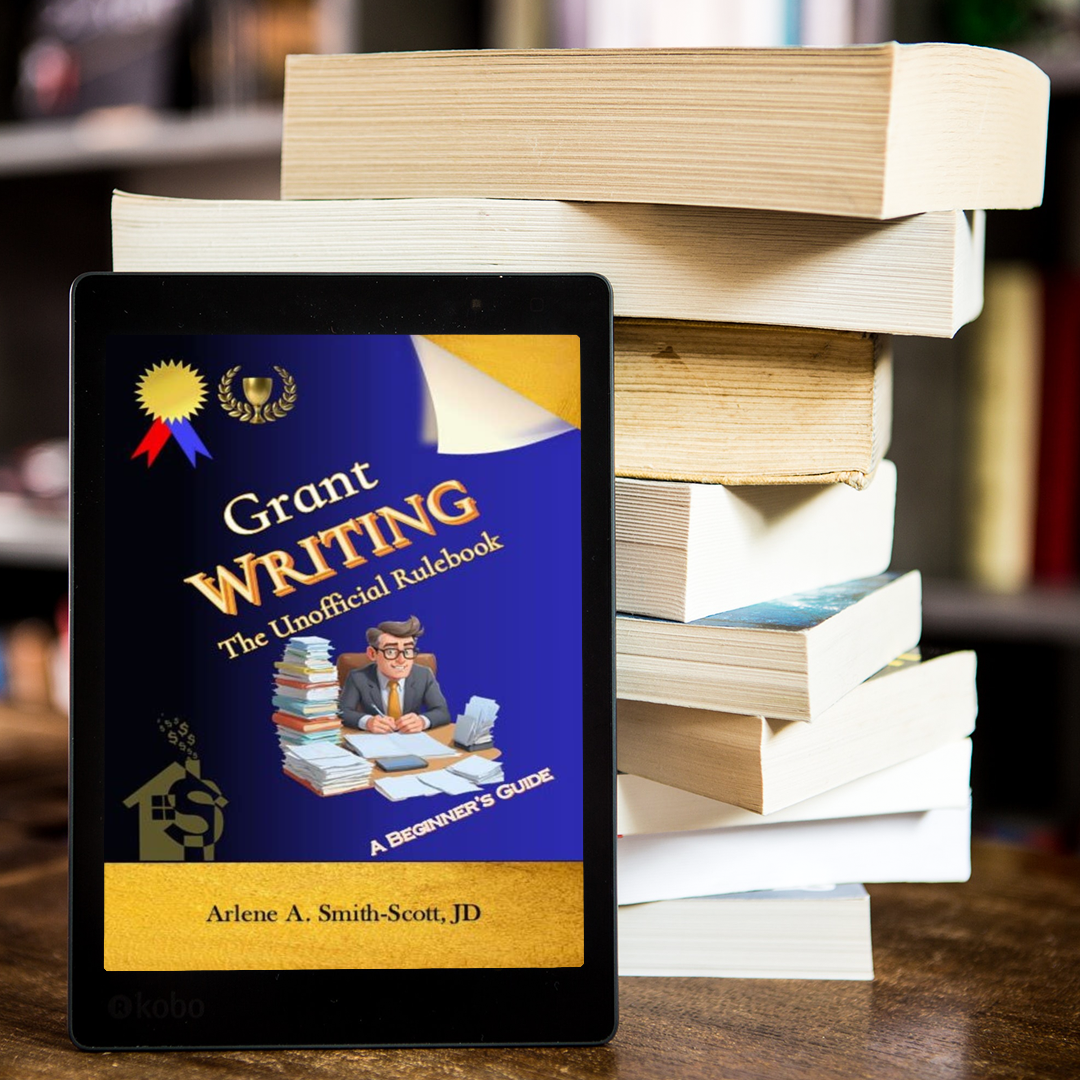
Grant Writing: The Unofficial Rulebook
The field-tested guide that informed how DWR Grant Writer Pro was built. Real lessons from a grant writer who has won, and lost, hundreds of proposals over three decades. If you manage grants, this belongs on your desk.
This is the strategic thinking behind every module in the platform. The book teaches the methodology; DWR Grant Writer Pro operationalizes it.
Get the bookAll 27 modules
Every feature built for one purpose: winning grants faster
Each module solves a specific problem in the grant lifecycle. Here is what they do, and why they matter.
Grants.gov Feed
Live Grants.gov integration with smart filters, agency search, and one-click pipeline import.
Stop manually searching five databases. New opportunities surface automatically, so your team spends time applying instead of hunting.
AI Assistant
Streaming AI chatbot trained on funder intelligence. Parses structured research from conversations and saves findings directly.
Ask a question about a funder, get a researched answer. The assistant learns your organization over time, so every session gets sharper.
Research Library
Searchable workspace for grant opportunities with filtering, sorting, bookmarking, and funder database access.
Every piece of research your team does lives in one place. When a colleague discovers a funder, the whole team benefits immediately.
Proposal Writing
AI-assisted drafts for all 8 standard proposal sections with streaming output, word count tracking, and grant context integration.
First drafts that sound like your organization, not a chatbot. The AI uses your selected grant data to personalize every section.
Success Library
Archive of winning proposals with rich metadata, lessons learned, versioning, and CSV export.
Your best proposals become reusable assets. New team members can study what worked instead of starting blind.
Clause Library
Risk-rated legal and compliance clauses with side-by-side comparison, standard response templates, and drag-and-drop sorting.
Respond to funder terms confidently. Color-coded risk ratings let your team flag problematic language before signing.
Document Manager
Full lifecycle management with drag-and-drop upload, version history, threaded comments with @mentions, and S3 cloud storage.
Every attachment, letter of support, and budget spreadsheet in one place. No more emailing files back and forth.
Dashboard
AI-powered insights, grant readiness indicators, priority deadline alerts, and milestone timeline visualization.
Open the app and immediately know what needs attention. No digging through tabs to find what is due this week.
Pipeline Tracking
Drag-and-drop Kanban board with a 7-stage lifecycle from Prospect through Closed, with workflow automation triggers.
See every grant at a glance and know exactly where it stands. Moving a card to "Submitted" can auto-create follow-up tasks.
Calendar
Deadline and event management with priority levels, grant-linked events, recurring event support, and completion toggles.
Every deadline, site visit, and reporting date in one calendar. Color-coded priorities mean the most urgent items jump out.
Workflows
If/Then rule builder with triggers for status changes, approaching deadlines, new grants, and budget thresholds.
Automate the repetitive work. When a grant hits "Awarded," the system can auto-create milestones and calendar events without anyone lifting a finger.
Financials
Grant-linked budget creation with line item management, category tracking, and matching fund calculations.
Build budgets that tie directly to specific grants. When the funder asks "where does the money go," the answer is already documented.
Compliance
AI-driven readiness assessment across 8 dimensions with color-coded pass/warning/fail indicators and actionable recommendations.
Know whether you are ready to apply before you invest 40 hours in a proposal. The system flags gaps you can fix before they cost you the award.
Reports
Three report types (Pipeline, Funder Analysis, Financial Summary) with tab-based interface, summary metrics, and CSV export.
Board meeting in an hour? Pull a pipeline report with success rates and funding totals. Export to CSV for the finance committee.
Analytics
Performance metrics including funding by period, success rate calculations, win/loss statistics, and pipeline trend visualizations.
See patterns over time. Know which funders you win with, which proposal sections need work, and how your pipeline is growing quarter over quarter.
Funder CRM
Interaction timeline with calls, emails, meetings, and notes. Relationship pipeline from Cold through Active with engagement scoring.
Institutional knowledge that stays when staff leaves. Every phone call, every email, every meeting note, stored and searchable.
Team Chat
Internal threaded conversations with tenant isolation and message tracking.
Quick questions answered inside the platform. No more switching to Slack or email to ask "did we hear back from that funder?"
Settings
User profile management, notification preferences, and organizational configuration.
Each team member controls their own experience. Set notification frequency, update roles, and manage access without calling support.
Common questions
Frequently asked questions
Answers to the questions we hear most from grant teams evaluating the platform.
What is DWR Grant Writer Pro?
What is the difference between the monthly plan and Build to Own?
How many people can use the platform?
Can the platform actually find grants for us?
Where does the funder information come from?
How does the AI help with writing?
How does compliance tracking work?
Can we track a grant from the moment we find it through closeout?
We have past winning proposals. Can we keep them in the platform?
How do budgets connect to grants?
Is it only for federal grants?
What happens to our data if we cancel?
How do I get help or talk to someone?
Grant insights, delivered monthly
Funding trends, deadline strategies, and product updates. No spam, ever.
Ready to stop renting your grant infrastructure?
Schedule a 30-minute consultation. We'll talk through your team, your grant volume, and whether DWR Grant Writer Pro is the right fit. No pressure, no hard sell.
Schedule Your Consultation